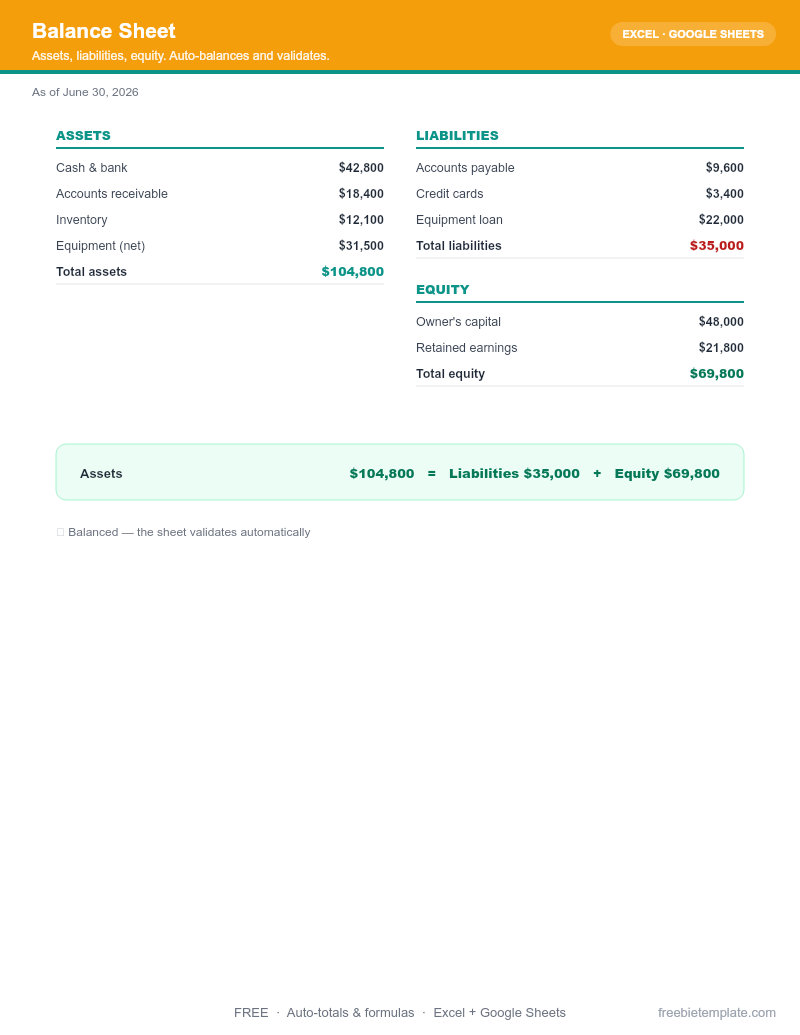
Free Balance Sheet Template
Assets, liabilities, equity. Auto-balances and validates.
Save this file straight to your Drive, then open it with Google Sheets — no download needed.
- ✓Auto-balance check
- ✓Current vs long-term split
- ✓Notes column
About this template
A balance sheet is a snapshot of what your business owns and owes on a single date. It follows one rule — Assets = Liabilities + Equity — and this free Excel template enforces it for you: a validation row turns green only when the two sides match, so you catch a mistyped number before it reaches your accountant or your bank.
It is built for small-business owners, freelancers, and bookkeepers who want a clean statement of financial position without buying accounting software. Sections are pre-split into current vs. long-term assets and liabilities the way lenders and reviewers expect to see them.
What's included
- Current assets (cash, accounts receivable, inventory, prepaid expenses) and long-term assets (equipment, property, intangibles)
- Current liabilities (accounts payable, short-term loans, accrued expenses) and long-term liabilities
- Owner's / shareholders' equity section with retained earnings
- Auto-summing section subtotals and grand totals — no formulas to write
- A balance-check row that flags any difference between total assets and total liabilities + equity
- A notes column for context on individual line items
How to use it
- Pick your "as of" date. A balance sheet is point-in-time. Set the date to your period end — month-end, quarter-end, or year-end — and pull balances as of that day.
- Enter your assets. Fill current assets first (cash, money customers owe you, inventory), then long-term assets like equipment and property at their book value. Subtotals update automatically.
- Enter your liabilities. List what you owe — supplier bills, credit cards, loans — split into current (due within 12 months) and long-term.
- Enter equity. Add owner contributions and retained earnings. If you're not sure of retained earnings, it's prior equity plus net income minus any draws.
- Confirm it balances. Check the validation row. If it does not balance, the difference usually points to a missed liability or a transposed figure — fix it before you share the statement.
License: Free for personal and commercial use. No attribution required. Do not resell the template itself.
Frequently asked questions
Is this balance sheet template really free?
Yes. Download the Excel file and use it for personal or commercial work — no signup, no watermark, and no attribution required. Only reselling the template itself is not allowed.
What are the three sections of a balance sheet?
Assets (what you own), Liabilities (what you owe), and Equity (the owner’s residual stake). The defining equation is Assets = Liabilities + Equity, and this template checks it for you.
What is the difference between current and long-term items?
"Current" means it will convert to cash or come due within 12 months — cash, receivables, supplier bills. "Long-term" is everything beyond a year, like equipment or a multi-year loan.
Why does my balance sheet not balance?
The most common causes are a missing liability, retained earnings that were not updated for the period’s net income, or a transposed number. The template’s balance-check row highlights the exact gap so you can find it fast.
Can I open it in Google Sheets?
Yes. Use "Save to Google Drive" above, then open with Google Sheets, or import the .xlsx directly. All formulas carry over.